



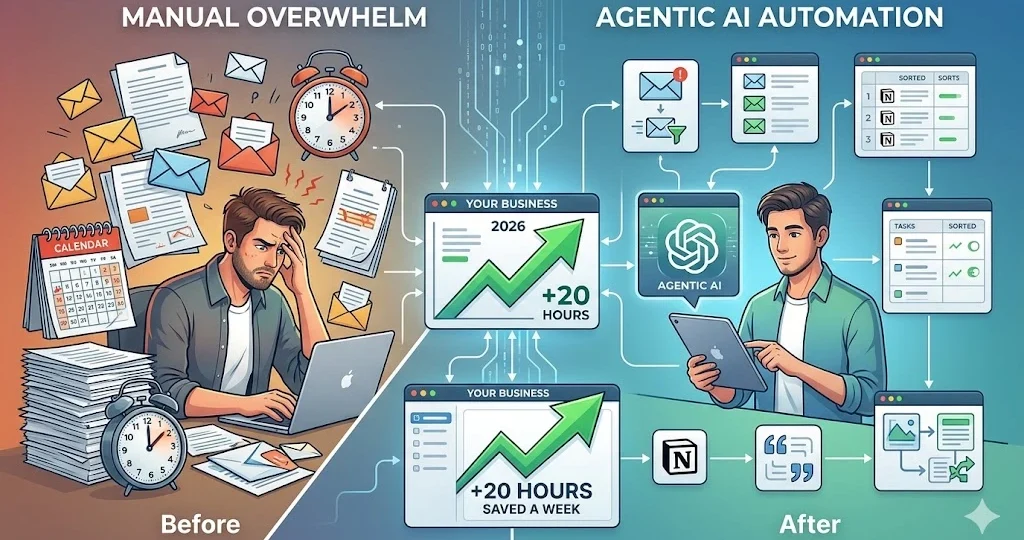
AI Automation for Small Business: A 2026 Step-by-Step Guide to Saving 20 Hours a Week
In 2026, the question is no longer “Will AI replace jobs?” but rather “How can I use AI to do the work of three people?”
Table Of Content
- The Shift: Why 2026 is the Era of “Agentic AI“
- The ROI of AI: Why Automation is a Business Asset
- The Core Pillars of Your AI-Driven Workflow
- Advanced Prompt Engineering for Business Owners
- Case Study: From Chaos to 20 Hours Saved
- Top 3 Micro-Tasks to Automate Today
- A. Inbox Zero Management
- B. Automated Customer Support
- C. Content Repurposing
- Choosing the Right Tool: A Comparison
- The “Human-in-the-Loop” Framework
- 8. Step-by-Step: Setting Up Your First Workflow (No-Code)
- Challenges and How to Solve Them
- The Future of AI in 2027 and Beyond
- The 30-Day AI Implementation Challenge
- Frequently Asked Questions (FAQs)
- Conclusion: Your Path Forward
For small business owners, freelancers, and entrepreneurs, administrative tasks like email management, scheduling, and data entry are the “silent killers” of productivity. They drain your energy, kill your creativity, and keep you stuck in the weeds. The secret to scaling your business isn’t working harder—it’s Agentic AI Automation. In this comprehensive guide, we will break down exactly how you can implement AI workflows to reclaim 20 hours of your week and move from “busy” to “productive.”
The Shift: Why 2026 is the Era of “Agentic AI“
Most people still think of AI as a simple chatbot (like ChatGPT) where you type a question and get a text answer. That is Passive AI. You ask, it answers. It requires you to be present for every single interaction.
Agentic AI (AI Agents) is fundamentally different. An AI agent is autonomous. It is given a specific goal, provided with access to your digital tools, and given the authority to perform tasks from start to finish without constant hand-holding.
-
Chatbot: “Write an email draft.”
-
AI Agent: “Check my inbox, identify urgent client requests, draft a reply based on our project status in Notion, and save it in my drafts for my final approval.”
The future belongs to those who move from “chatting” to “delegating.”
The ROI of AI: Why Automation is a Business Asset
When you automate a task, you aren’t just “saving time.” You are building scalability.
Consider the “10-minute rule.” If you spend 10 minutes managing an email, and you get 20 emails a day, that is over 3 hours of your time every single day. Over a month, that is nearly 100 hours lost. By automating this, you reclaim those 100 hours to focus on high-value activities—like client acquisition, product development, or taking a well-deserved break. AI automation is not an expense; it is an investment in your business’s growth.
The Core Pillars of Your AI-Driven Workflow
Before you start building, you need to understand the four components that make a workflow successful:
-
The LLM (Brain): The reasoning engine (e.g., GPT-5, Claude 3.5, or Gemini 1.5). This is where the AI “thinks.”
-
Memory: A system to keep track of your preferences, brand voice, and past data.
-
Connectivity: Using tools like Zapier or Make to connect your AI to your email, calendar, and CRM.
-
Human-in-the-Loop: This is non-negotiable. You always keep a final “approval” step to ensure accuracy and maintain the personal, human touch in your business communications.
Advanced Prompt Engineering for Business Owners
An AI agent is only as good as the instructions you give it. To build a highly effective agent, use this structure for your “System Prompt”:
“You are an expert executive assistant for [Your Business Name]. Your goal is to draft replies that are professional, concise, and empathetic. Always follow the [Brand Voice] attached in the system notes. When analyzing emails, categorize them based on urgency: ‘High’ for billing/legal, ‘Medium’ for project updates, and ‘Low’ for general inquiries. Before sending, always save to drafts and wait for human review.”
By being this specific, you reduce errors and ensure the AI acts like a professional extension of yourself.
Case Study: From Chaos to 20 Hours Saved
Meet Ali, a freelance graphic designer. Ali used to spend 3 hours daily managing incoming emails, sending invoices, and following up on quotes.
The Transformation:
Ali implemented a Zapier workflow.
-
When a new email came in with the word “Quote,” the AI extracted the client name and project details.
-
The AI cross-referenced Ali’s Notion database to see his current availability.
-
The AI drafted a personalized quote email, including a link to his calendar.
The Result: Ali saved 15 hours a week immediately. He used that time to double his marketing efforts and onboard two new high-ticket clients, increasing his revenue by 40% in just one month.
Top 3 Micro-Tasks to Automate Today
A. Inbox Zero Management
Stop reading every single newsletter. Create an AI agent that:
-
Scans your inbox daily.
-
Tags emails as “Urgent,” “To Do,” or “Newsletter.”
-
Draft responses for standard inquiries.
Pro Tip: Start by giving your AI agent “Read-only” access to your inbox. Once you gain confidence in the quality of the drafts, you can enable “Write” permissions to allow the AI to save drafts for your final review.
B. Automated Customer Support
Build a Knowledge-Base AI agent that uses your company’s PDFs, website text, and past emails to answer customer queries instantly on your website or WhatsApp. This works 24/7, even while you sleep.
Pro Tip: When building your Knowledge-Base, upload your “Brand Voice” guidelines as a PDF. Instruct the AI: “Always remain professional, keep responses under three sentences, and avoid overly technical jargon unless requested by the client.
C. Content Repurposing
Take one long-form blog post and turn it into 5 LinkedIn posts, 3 Twitter threads, and 1 newsletter summary. Use an agent to extract the core arguments and format them according to the platform’s requirements.
Pro Tip: To maximize engagement, feed the AI agent examples of your own top-performing posts from the past. This helps the AI mimic your unique tone and structure for future platform-specific content.
Choosing the Right Tool: A Comparison
| Tool Name | Best For | Learning Curve |
| Zapier Central | General Business Automation | Easy |
| Relevance AI | Custom AI Agents/Data | Medium |
| Make.com | Complex Workflows | Hard |
The “Human-in-the-Loop” Framework
We often fear that AI might say something “off-brand” or make a mistake that could hurt our professional reputation. The solution to this is the “Human-in-the-Loop” framework.
Think of your AI agent not as an autonomous employee that works in the dark, but as a highly capable junior assistant who drafts work for your final review. When your agent prepares an email, a blog outline, or a quote for a client, it doesn’t send it immediately. Instead, it saves it in your “Drafts” folder or a dedicated “Review” dashboard.
This process serves two purposes:
1. Quality Control: You maintain 100% control over the brand voice and accuracy.
2. The Feedback Loop: When you correct the AI’s draft, you are essentially training the AI. This feedback teaches the agent what to avoid in the future. Over time, your agent becomes smarter and more aligned with your specific business needs, requiring less and less of your time to review.

8. Step-by-Step: Setting Up Your First Workflow (No-Code)
-
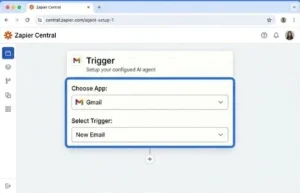
Step 1: Choose Your Platform. Start with Zapier Central.
-
Step 2: Define the Trigger. Set the trigger: “When a new email arrives from a potential client…”
-
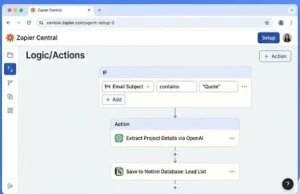
Step 3: Define the Logic. Tell the AI: “Check if the email contains a request for a quote. If yes, extract the project details and save them to my Notion database.”
-
Step 4: The Safety Check. Always set the agent to “Human Approval Mode.” This ensures that the agent prepares the work, but you click the final “Send” button.
Challenges and How to Solve Them
-
AI Hallucination: Sometimes AI makes things up. Solution: Provide your agents with a “System Prompt” that says: “If you do not have the information in my attached documents, tell me that you don’t know, rather than making up an answer.”
- For “AI Hallucination”: “Always verify AI-generated dates, prices, and technical specifications against your source documents before finalizing any client-facing communication.
-
Privacy: Never share sensitive client passwords. Stick to enterprise-grade tools that offer data privacy, like Claude for Business.
- For “Privacy”: “Consider using ‘Data Redaction’ techniques if you are handling highly sensitive information, ensuring that personal identifiable information (PII) is removed before sending data to the AI model.”
-
Cost Management: Start small, test your workflows, and scale only when you see a clear return on investment.
- For “Cost Management”: “Monitor your API usage dashboard weekly. Set up hard limits to prevent over-spending during high-traffic months, allowing you to scale predictably.”
The Future of AI in 2027 and Beyond
As we look toward 2027, the barrier to entry for AI automation is dropping rapidly. We are moving toward a world where AI agents won’t just follow static instructions; they will learn from your past habits and proactively suggest optimizations. For example, if your AI agent notices that your “Quote” emails are consistently being opened at 10 AM, it will automatically adjust its scheduling to maximize response rates.
The businesses that thrive in the coming years will be the ones that view AI not as a separate tool, but as a digital layer integrated into every aspect of their operations. If you haven’t started your automation journey, today is the best day to begin. The complexity of the technology is decreasing, but the competitive advantage it provides is only growing.
The 30-Day AI Implementation Challenge
To truly reclaim your time, you don’t need to do everything at once. Follow this 30-day plan to integrate AI into your workflow:
- Week 1 (Audit): Spend 3 days tracking exactly where your time goes. Identify 3 repetitive tasks (e.g., email drafting, data entry, scheduling).
- Week 2 (Setup): Pick one tool (like Zapier Central) and set up your first automation for one of those tasks. Test it, run it, and refine the prompt.
- Week 3 (Refine): Focus on the “Human-in-the-Loop” safety checks. Ensure your AI agent is aligned with your brand voice by providing it with examples of your best past work.
- Week 4 (Scale): Once your first workflow is stable, add a second task. By the end of the month, you will have automated at least two major administrative burdens, saving you roughly 5 hours per week immediately.
Consistency is key. Automation is not a one-time project; it’s a new way of working.
Frequently Asked Questions (FAQs)
Q1: Do I need to learn coding?
A: Absolutely not. In 2026, most agent builders use natural language instructions.
Q2: Is AI automation expensive?
A: Most platforms offer a free tier. You can start for $0 and scale as your business grows.
Q3: Can AI handle my brand voice?
A: Yes, by uploading samples of your past writing to the AI’s memory/knowledge base.
Q4: What if the AI makes a mistake?
A: This is why the “Human-in-the-Loop” step is mandatory. You review every outgoing communication.
Q5: Is my data safe?
A: Use enterprise-grade platforms that allow you to opt out of data training for their models.
Q6: Can this work for non-tech businesses?
A: Yes. If you have an email address and a way to store data (like Google Sheets or Notion), you can automate.
Q7: How much time will it really save?
A: Most users report saving 15–20 hours a week by automating routine administrative work.
Q8: Which AI model is best for business?
A: For most business tasks, Claude 3.5 Sonnet or GPT-4o are current industry leaders.
Q9: Do I need to pay for multiple subscriptions?
A: Start with one core platform like Zapier; it connects to almost everything else.
Q10: Where do I start today?
A: Identify the one task you repeat every single day. That is your first candidate for automation.
Conclusion: Your Path Forward
The transition from doing everything manually to running an AI-assisted business is a journey. Start by automating one repetitive task this weekend. By next week, you’ll have a system in place. By next month, you’ll have gained enough time back to focus on the strategic side of your business—the side that actually makes money.
Ready to get started? Pick one task that you dread doing every day. That is the first task your new AI agent should learn.







No Comment! Be the first one.