



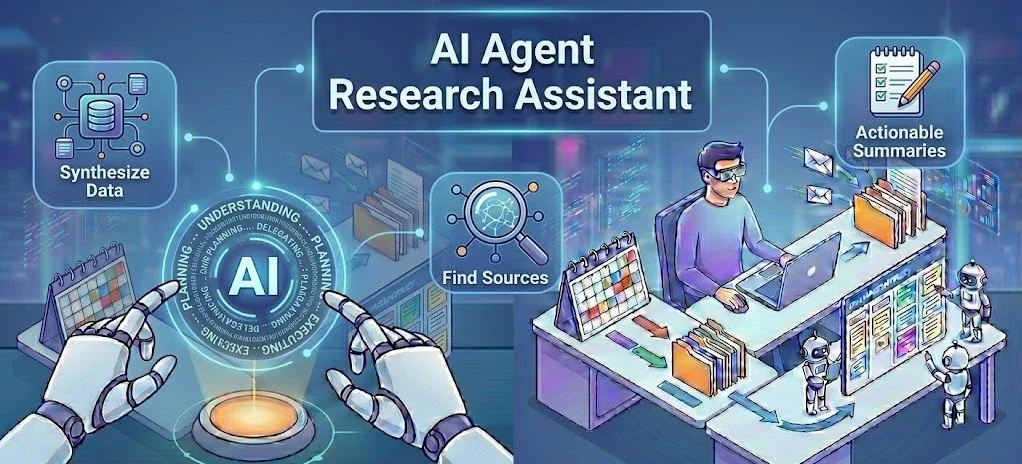
Beyond ChatGPT: How to Use AI Agents for Personal Productivity in 2026
Imagine waking up in the morning, opening your laptop, and finding that your emails have already been sorted, your weekly grocery list has been ordered based on your budget, and a deep-dive research report for your upcoming project is waiting on your desktop.
Table Of Content
- What is Agentic AI? (And How It Differs from ChatGPT)
- The Core Components of an AI Agent
- High-Demand Micro-Tasks You Can Automate with AI Agents
- 1. Autonomous Research and Reporting
- 2. Inbox Zero Management
- 3. Smart Schedule Coordination
- Top Free and Accessible AI Agent Tools in 2026
- Step-by-Step Guide: How to Create Your First Custom AI Productivity Agent
- Step 1: Open the GPT Builder
- Step 2: Configure the Agent’s Instructions
- Step 3: Enable Capabilities
- Step 4: Test and Refine
- The Challenges of Agentic AI: What to Watch Out For
- Summary: Preparing for an Agent-Driven Future
- Frequently Asked Questions (FAQs)
- Q1: What is the difference between an AI tool and an AI agent?
- Q2: Do I need to know Python programming to use AI agents?
- Q3: Can AI agents handle financial transactions or shop for me?
- Q4: What is “Agentic AI”?
No, a human personal assistant did not do this. An AI Agent did.
In 2026, the artificial intelligence landscape has shifted dramatically. The days of simply typing a prompt into ChatGPT and waiting for a text response are fading. We are now living in the era of Agentic AI—autonomous digital assistants that don’t just answer questions, but actually execute complex tasks for you from start to finish.
If you want to stay ahead of the curve and multiply your daily productivity by 10x, understanding AI agents for personal productivity is no longer optional. This comprehensive guide will explain what AI agents are, how they work, and how you can set up your first autonomous assistant today without writing a single line of code.
What is Agentic AI? (And How It Differs from ChatGPT)
To understand why AI agents are triggering a massive tech revolution, we need to compare them with the traditional AI tools we have been using:
-
Traditional AI (Chatbots): Tools like standard ChatGPT or Claude are conversational. You give them a prompt, and they give you a response. If you want to plan a trip, you ask for an itinerary. Then you have to open booking websites, copy-paste flight numbers, and manually book everything. They cannot act outside their chat window.
-
Agentic AI (AI Agents): An AI agent is autonomous. It is given a goal, a set of digital tools, and the permission to act independently. If you tell an AI agent, “Book a flight to Dubai under $500 for next Friday,” the agent will browse flight search engines, analyze prices, choose the best option, fill out your details, and stop right at the payment screen for your final approval.
Key Takeaway: Chatbots think and write. AI Agents think, plan, and execute.
The Core Components of an AI Agent
Every modern AI agent relies on four foundational pillars to perform micro-tasks efficiently:
-
The Brain (LLM): This is the underlying Large Language Model (like GPT-5 or Claude 4) that handles reasoning, understanding language, and making decisions.
-
Memory (Vector Databases): Unlike simple chatbots that forget your preferences once you close the tab, AI agents have short-term and long-term memory. They remember your budget, your work style, and past mistakes they made so they don’t repeat them.
-
Planning Capabilities: When given a massive goal, an agent breaks it down into a sequence of smaller tasks (micro-tasks), self-reflects on its progress, and corrects its path if something goes wrong.
-
Tools: This is what gives agents their power. Agents can connect to external software interfaces (APIs). They can use Google Calendar, access your Gmail, browse live web pages, use calculators, and even interact with your Notion workspace.
High-Demand Micro-Tasks You Can Automate with AI Agents
People are actively searching for ways to eliminate boring, repetitive tasks from their lives. Here are the top ways you can deploy AI agents for personal productivity right now:
1. Autonomous Research and Reporting
Instead of spending three hours opening twenty different tabs on Google to research a topic, you can deploy a research agent (like Perplexity Pro or CrewAI agents). You give it a topic, and the agent will crawl the web, filter out fake news, synthesize data, cite sources, and write a complete PDF brief while you drink coffee.
2. Inbox Zero Management
An email AI agent can sit inside your Outlook or Gmail workspace. It reads incoming emails, categorizes them by urgency, drafts context-aware replies based on your past writing style, and highlights the only 3 emails out of 100 that actually require your human eyes.
3. Smart Schedule Coordination
Forget back-and-forth emails trying to find a meeting time. Calendar agents can look at your personal calendar, predict your energy levels throughout the day, talk directly to another person’s calendar agent, and lock in the perfect slot without bothering either human.
Top Free and Accessible AI Agent Tools in 2026
You don’t need to be a software developer to build or use AI agents. The following table showcases the best user-friendly platforms available today:
| Platform | Best For | Technical Skill Needed | Pricing |
| OpenAI GPTs / Assistants | Custom personal tasks inside ChatGPT | None (Natural Language) | Free / $20 Month |
| Zapier Central | Linking AI to over 6,000 everyday apps | Low (Drag & Drop) | Free Tier Available |
| MultiOn | Web actions (Shopping, Booking, Filling forms) | None (Browser Extension) | Freemium |
| Relevance AI | Creating a workforce of text & research agents | Medium | Free Trial |

Step-by-Step Guide: How to Create Your First Custom AI Productivity Agent
Let’s build a Personal Content & Research Assistant inside your existing ChatGPT workspace. This agent will filter industry news and generate tailored summaries for you every day.
Step 1: Open the GPT Builder
Log in to your ChatGPT account, click on your profile, and select “Explore GPTs” or “Create a GPT”. This is OpenAI’s built-in, no-code AI agent builder.
Step 2: Configure the Agent’s Instructions
In the configuration panel, you need to provide clear guidelines. Copy and paste this optimized system prompt into the Instructions box:
You are my Personal Research Agent. Your job is to act as a filter for massive amounts of information.
Whenever I give you a topic or a URL, you will:
1. Extract the top 3 core facts.
2. Identify any underlying bias or marketing fluff and eliminate it.
3. Provide a 150-word actionable summary explaining why this matters to my productivity.
Tone: Concise, objective, and sharp. Do not use generic introductory sentences.
Step 3: Enable Capabilities
Ensure that Web Browsing and Code Interpreter are checked in the capabilities section. This allows your agent to actively leave the ChatGPT ecosystem to fetch live web data for you.
Step 4: Test and Refine
Type a prompt like: “Look up the latest developments in solar energy tech from this morning and give me my summary.” Watch the agent initialize its browser tool, search multiple news portals, compile the data, and deliver a clean, fluff-free brief according to your exact formatting rules.
The Challenges of Agentic AI: What to Watch Out For
While autonomous agents sound incredible, the technology is still evolving, and users should stay aware of specific limitations:
-
Hallucination in Loops: If an agent gets stuck on a broken website or encounters conflicting data, it can occasionally loop through tasks or create false information to satisfy its goal. Always review critical work before publishing it.
-
Security & Data Privacy: Because agents require access to your email, calendars, or browsers to be useful, you must ensure you are using reputable platforms. Never give an unverified open-source agent access to your primary banking credentials or sensitive personal passwords.
-
Token Consumption Costs: If you run advanced multi-agent systems (like CrewAI or AutoGPT) locally, they make hundreds of background calls to LLM databases, which can consume API credits rapidly. Stick to user-focused SaaS tools if you are on a budget.

Summary: Preparing for an Agent-Driven Future
The transition from “searching the web” to “delegating to agents” is the biggest architectural shift in personal computing since the invention of the smartphone. By setting up basic micro-task automations today, you save hours of administrative dread every week and free up your brain for creative, strategic thinking. Start small with one custom GPT, master its instructions, and expand your digital workforce as you grow!
Frequently Asked Questions (FAQs)
Q1: What is the difference between an AI tool and an AI agent?
Answer: An AI tool (like a basic AI text generator) requires constant human prompts for every single action it performs. An AI agent is given a final destination or goal and has the autonomy to figure out the steps, use different software tools, self-correct its errors, and complete the job independently without human intervention.
Q2: Do I need to know Python programming to use AI agents?
Answer: Not anymore. In 2026, major platforms like Zapier Central, OpenAI, and various browser extensions will allow you to build, customize, and deploy fully functional AI agents using plain, everyday English commands.
Q3: Can AI agents handle financial transactions or shop for me?
Answer: Yes, web-agent systems like MultiOn can navigate shopping carts and checkout pages. However, for security purposes, current consumer systems are built with a “Human-in-the-Loop” architecture, meaning the agent completes the entire task but pauses to require your facial recognition or manual click before pulling money from your card.
Q4: What is “Agentic AI”?
Answer: Agentic AI is a term used to describe AI systems that possess agency—meaning they exhibit intentional behavior, goal-oriented planning, independent decision-making, and the ability to interact with digital environments rather than simply outputting static text or images.







[…] the world of technology, that is exactly what AI Agents […]
[…] The Shift: Why 2026 is the Era of “Agentic AI“ […]