

What is an AI Second Brain? The Ultimate 2026 Guide to a Personal Knowledge OS
Have you ever saved a useful article link on your device? Perhaps you typed a quick note in your phone or dropped an important PDF document into a random folder. However, you completely forgot about it a week later. If you are nodding your head, you are definitely not alone. Consequently, our digital notes are now scattered across five different apps. Our computer desktops look messy. Furthermore, our browsers lag under the weight of dozens of open tabs we swear we will read later.
Table Of Content
- What is an AI Second Brain? A Modern Definition
- Traditional Note-Taking vs. The AI Second Brain (The 2026 Paradigm Shift)
- The Three Core Layers of a Personal Knowledge OS
- 1. The Smart Capture Layer
- 2. The Semantic Organization Layer
- 3. The Execution Engine
- Top 4 AI Second Brain Tools Dominating 2026
- 1. Taskade: The Multi-Agent Automation Hub
- 2. Notion AI: The Aesthetic Workspace
- 3. Obsidian (with AI Community Plugins): The Privacy Fortress
- 4. Mem.ai: The Zero-Folder Pioneer
- Why You Need a Personal Knowledge OS Right Now
- ❓ Frequently Asked Questions (FAQs)
- Q1: Is an AI Second Brain safe for my highly private data?
- Q2: How exactly does an AI Second Brain differ from standard ChatGPT?
- Q3: Do I need programming or coding skills to set one up?
- Q4: Can I import my existing notes from old apps like Evernote or Apple Notes?
In the past, productivity experts told us to build a manual “Second Brain”. Tiago Forte created this popular concept. It required strict folder structures, tags, and complex naming conventions. But let’s be honest, because nobody living in 2026 has the time to organize files manually anymore. As a matter of fact, manual organization feels exactly like a second job.
Fortunately, that is where the biggest technology shift of 2026 comes into play. This new system is called The Personal Knowledge OS, which is commonly known as an AI Second Brain.
But what exactly is it? How does it differ from old-school note-taking apps? Most importantly, how can it save you hours of digital frustration every single week? In this comprehensive guide, we will break down everything you need to know. Therefore, you can transition from digital chaos to a streamlined, automated mind.
“Personally, main bhi pehle Notion folders aur endless bookmarks mein gum ho jati thi. Koi important link save karti thi to lagta tha treasure mil gaya, lekin agle hi hafte wo kahan gayab hota tha, samajh hi nahi aata tha! Let’s face it—hum sab is digital mess se guzar rahe hain.”
“Jab maine khud Taskade aur Notion AI par shift kiya, to mujhe realize hua ki memory offload karna kisey kehte hain. Ab mujhe yaad nahi rakhna padta ki maine kaun sa point kahan likha tha, mera AI assistant khud connections dhoond leta hai.”
What is an AI Second Brain? A Modern Definition
An AI Second Brain is an intelligent, centralized digital ecosystem. It automatically captures, categorizes, links, and recalls all your data. This includes your thoughts, notes, bookmarks, documents, and voice memos. Therefore, it does not act as a passive, static cloud storage folder like a traditional Google Drive or Dropbox. Instead, an AI Second Brain uses advanced artificial intelligence to act as an active cognitive partner.
To understand it better, think of it as hiring a super-intelligent, tireless personal assistant. This assistant carefully reads every single PDF you upload. It reviews every random thought you jot down at 2 AM. Additionally, it analyzes your web bookmarks. Consequently, it instantly hands you the exact piece of information you need the moment you ask for it.
The core philosophy here is truly revolutionary. Instead of you changing your natural workflow to fit into a rigid software setup, a Personal Knowledge OS adapts entirely to the way your human mind naturally works.
Traditional Note-Taking vs. The AI Second Brain (The 2026 Paradigm Shift)
To understand why tech-savvy professionals, students, and creators are ditching standard apps, we must examine how digital organization has evolved.
-
Traditional Note-Taking (The Old Way): First, you write a note or clip an article. You must then manually decide which folder it belongs to. You spend precious minutes typing out tags like
#marketingor#ideas. If you want to find that note six months later, you must pray that you remember the exact keyword. If you forget the tag, that valuable piece of knowledge is buried forever under digital dust. -
AI Second Brain (The 2026 Way): In contrast, you can just do a fast, messy brain dump. You can record a quick voice memo while driving, or drag-and-drop a chaotic 50-page research paper into your app. You do zero manual tagging. This is because the underlying AI automatically analyzes the context. It extracts key themes, links them horizontally to similar notes, and files them safely. When you need it, you simply type a casual question in plain English.
The Three Core Layers of a Personal Knowledge OS
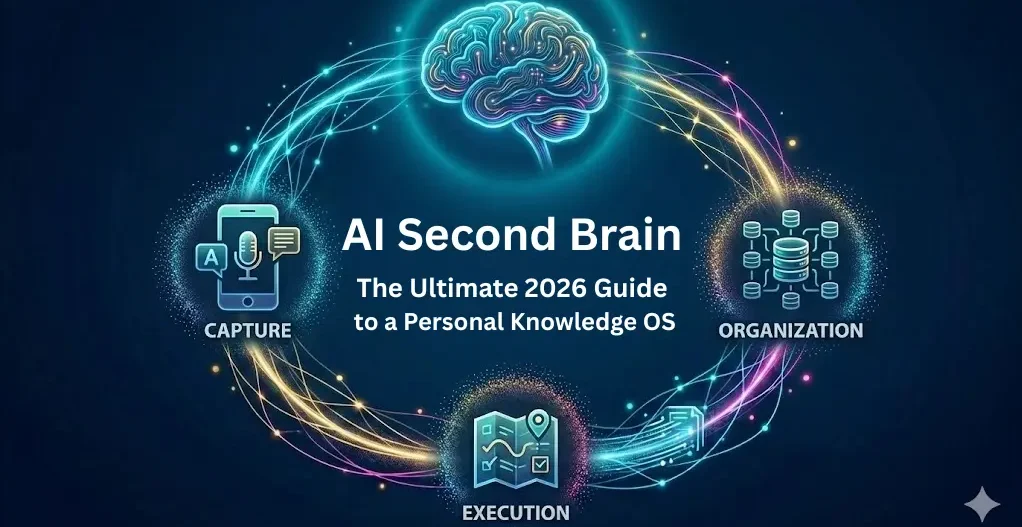
A true, fully functioning AI Second Brain does not just sit in the background waiting for you to browse folders. On the contrary, it completes a continuous structural loop across three distinct layers:
1. The Smart Capture Layer
The biggest bottleneck in knowledge management is the friction of capturing ideas. For example, if an app takes more than three seconds to open and set up, your brain will choose to forget the idea
The Smart Capture layer solves this problem by offering frictionless ingestion points. For instance, you can forward a Telegram bot message directly to your system. You can also upload an audio file, a tweet, a snapshot of a physical book page, or a Kindle highlight. The system absorbs it immediately. Meanwhile, the integrated AI handles the heavy lifting. It instantly generates accurate transcriptions and provides short summaries of massive data blocks.
2. The Semantic Organization Layer
This specific layer is where the real magic happens. Traditional databases rely on “Lexical Search”. This means they look for exact character-to-character matches. For example, if your note contains the word “automobile” and you search for “car,” a traditional app will show zero results.
In contrast, an AI Second Brain utilizes Semantic Search. It looks past the literal letters and searches by concept, meaning, and intent. It easily understands that “car,” “vehicle,” and “automobile” refer to the same basic idea. Furthermore, it creates automatic connections between cross-disciplinary notes. For instance, if you write a note about a psychological bias, the AI might automatically surface an old note about copywriting strategies. Thus, it shows you exactly how those two concepts intersect.
3. The Execution Engine
Your Second Brain is not meant to be a digital museum where information goes to look pretty. Instead, it is meant to produce real-world output. The Execution Engine allows you to chat directly with your private data pool.
Therefore, you do not need to prompt ChatGPT to write an essay based on the general public internet. That often results in generic, boring content or complete AI hallucinations. Instead, you can prompt your own Second Brain like this:
“Based on all the podcast transcripts, Kindle clips, and meeting notes I saved about startup funding last quarter, draft a highly specific 600-word newsletter post for my subscribers.”
Because of this specific data, the AI will isolate only your curated knowledge to build the draft. As a result, the output perfectly matches your personal voice, facts, and unique insights.
Before diving into the tools, you might also want to read our beginner’s guide on What are AI Agents to understand how autonomous systems work.
Top 4 AI Second Brain Tools Dominating 2026
If you are ready to build your Personal Knowledge OS today, the market offers several outstanding options. These are tailored to different user styles, ranging from clean no-code setups to highly technical, secure local systems.
1. Taskade: The Multi-Agent Automation Hub
Taskade has evolved into one of the most powerful tools for teams and individual power-users alike. It does not just store your notes. Additionally, it allows you to build custom autonomous AI agents that live inside your knowledge folders. For example, you can assign an AI agent to monitor your “Reading List” folder. Then, it will automatically convert every newly saved article into a brief, actionable bullet-point summary.
2. Notion AI: The Aesthetic Workspace
For users who value a beautifully designed, centralized database system, Notion AI remains a top-tier choice. Its special Q&A feature allows you to query your entire workspace instantly from any page. Furthermore, Notion’s AI properties can automatically fill out database columns. They can tag entry items based on text content and translate entries into multiple languages smoothly.
3. Obsidian (with AI Community Plugins): The Privacy Fortress
Obsidian is the gold standard for tech enthusiasts, researchers, and writers who refuse to trust cloud servers with their deeply personal thoughts. This is because Obsidian saves all your files as plain local Markdown text files directly on your hard drive. By installing open-source AI community plugins like Smart Connections, you can run localized semantic search algorithms over your files. Consequently, you can map out an intricate, visual spider-web graph of your knowledge.
4. Mem.ai: The Zero-Folder Pioneer
Mem.ai was built from the ground up with a unique belief. The creators believed that human-designed folders are fundamentally broken. Therefore, in Mem, there are no folders or nested categories. You simply stream all your data into a single timeline. Finally, the platform’s proprietary AI naturally organizes, clusters, and brings past relevant notes back to the surface exactly when you are writing a related document./span> <button class=”mat-mdc-tooltip-trigger button image-fade-on hide-from-message-actions” aria-label=”Learn More” aria-controls=”sources” aria-expanded=”false” aria-describedby=”p-rc_f9468055c5381979-62 cdk-describedby-message-ng-1-28″>
Why You Need a Personal Knowledge OS Right Now
We are currently living through an era of unprecedented information inflation. As a matter of fact, we no longer suffer from a shortage of data. Instead, we are drowning in information overload. We read tweets, skim through newsletters, watch educational videos, and listen to multi-hour podcasts. Yet, our actual cognitive retention remains incredibly low because the human brain evolved to generate ideas, not to store them.
By letting a Personal Knowledge OS act as your digital vault, you free up your biological human brain. Consequently, you can focus entirely on your true superpowers: creative thinking, critical analysis, and deep execution.
❓ Frequently Asked Questions (FAQs)
Q1: Is an AI Second Brain safe for my highly private data?
Ans: Yes, data security is a top priority for developers in 2026. For example, local-first platforms like Obsidian ensure your files never leave your physical computer. Meanwhile, cloud-based enterprise platforms like Notion AI and Taskade use banking-grade end-to-end encryption. They adhere to strict privacy frameworks, explicitly guaranteeing that your personal notes are kept private. Therefore, they are never utilized to train public AI models.
Q2: How exactly does an AI Second Brain differ from standard ChatGPT?
Ans: ChatGPT is trained on billions of pages from the public internet. Thus, it knows general facts, but it knows absolutely nothing about your unique identity, current projects, or personal goals. In contrast, an AI Second Brain flips this dynamic completely. It focuses exclusively on your personal history, uploaded documents, and notes. As a result, it delivers answers that are 100% contextualized and personalized to your life, without any internet fluff.
Q3: Do I need programming or coding skills to set one up?
Ans: Not at all. The vast majority of mainstream tools like Mem.ai, Taskade, and Notion AI feature completely intuitive, visual, no-code interfaces. Therefore, setting them up is as straightforward as typing out a normal text message. You can also just drag an image file from your desktop. The complex artificial intelligence mechanics run silently behind the scenes.
Ans: Yes! Almost all modern Personal Knowledge OS platforms include built-in one-click migration wizards. You can easily export your data from older platforms as .txt, .docx, or .json files. Consequently, you can ingest them into your new AI-powered brain smoothly.



[…] Step 3: Structuring Your “Second Brain“ […]