



What are AI Agents for Beginners? A Simple Guide (2026)
Imagine having a personal assistant who doesn’t just write a shopping list for you but actually goes to the store, buys the items, and brings them to your kitchen.
Table Of Content
- 1. What is an AI Agent in Simple Terms?
- 2. AI Tools vs. AI Agents: What is the Core Difference?
- 3. The Architecture: How Do AI Agents Actually “Think”?
- Pillar 1: The Brain (The Large Language Model)
- Pillar 2: Memory (Short-Term vs. Long-Term)
- Pillar 3: Planning and Self-Reflection
- Pillar 4: The Tools (Giving the AI Hands)
- 4. Real-World Applications: Deep Dive Into Everyday Uses
- Scenario A: Autonomous Market Research
- Scenario B: Multi-Agent Content Teams
- Scenario C: Advanced Inbox Management
- 5. 5 Best Free AI Agent Platforms for Beginners to Try
- 6. The Challenges and Limitations of Autonomous AI
- 1. The Risk of Infinite Loops
- 2. Hallucinations in Actions
- 3. Increased API Consumption
- 7. Future Outlook: What Happens After 2026?
- 8. Conclusion: Your Immediate Next Step
- 🙋♂️ Frequently Asked Questions (FAQs)
- Q1. Will AI agents completely replace freelancers and content writers?
- Q2. Do I need to know Python or Java to use an AI agent?
- Q3. Can I run these autonomous agent tools on a regular smartphone?
- Q4. What is the main difference between an AI tool and an AI agent?
In the world of technology, that is exactly what AI Agents do.
If you are still only using ChatGPT to write essays or generate emails line-by-line, you are missing out on the biggest tech shift of 2026. The era of simple AI tools is fading, and the era of Autonomous AI Agents is officially here.
In this comprehensive ultimate guide, we will break down what AI agents are, explore how they work behind the scenes, evaluate the best free tools, and show you exactly how to use them to automate your daily life—even if you have zero coding skills.
1. What is an AI Agent in Simple Terms?
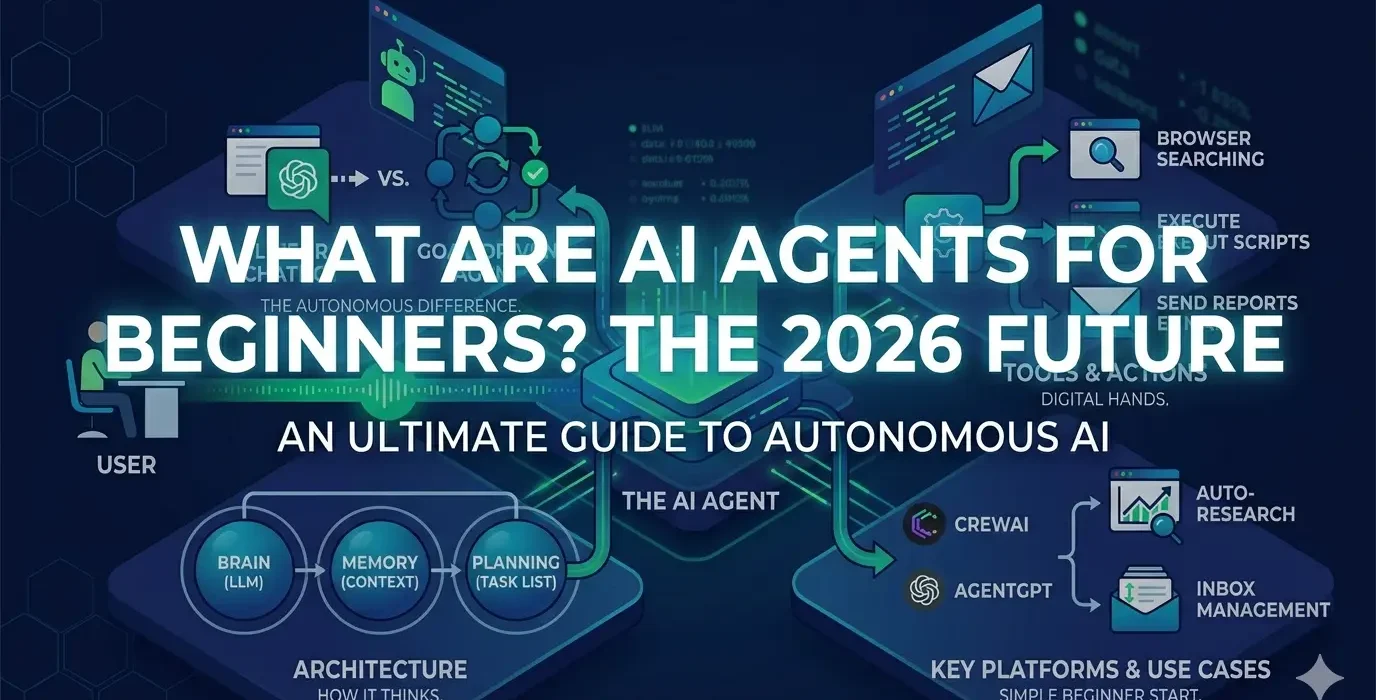
An AI Agent is an independent, intelligent software program powered by an advanced Large Language Model (LLM). Instead of just answering text prompts linearly, it is structurally designed to look at a grand goal you give it, create a micro-checklist of steps on its own, use digital tools, and execute those tasks without needing a human to press enter at every stage.
Unlike traditional AI tools that wait for your command at every single step, an AI agent is completely autonomous.
To understand this clearly, let’s look at an everyday business workflow:
-
The Old AI Tool Method: You ask a chatbot to write an email. It writes it. Then you have to manually copy it, open your email app, paste the text, find the client’s email address from your notes, and hit send. If you have 50 clients, you have to repeat this 50 times.
-
The Modern AI Agent Method: You give the agent a single objective: “Find my top 5 inactive clients from this Excel sheet, draft a personalized follow-up offering them a 10% discount, and email it to them automatically.” The agent scans the sheet, writes custom drafts, connects to your email server, and executes the deliveries while you drink coffee.
2. AI Tools vs. AI Agents: What is the Core Difference?
It is easy to confuse standard AI utility software with autonomous agents. To keep your website’s readers educated and structurally sound, let’s look at this simple, clear comparison table:
| Feature Dimension | Traditional AI Tools (e.g., Standard ChatGPT, Claude) | Autonomous AI Agents (e.g., CrewAI, AutoGPT, AgentGPT) |
| Operational Control | Prompt-Driven: Stops completely after generating a single answer. | Goal-Driven: Receives one big instruction and works until it’s done. |
| Logic & Workflow | Linear: Input (Prompt) $\rightarrow$ Output (Response). No self-review. | Looped: Thinks $\rightarrow$ Plans $\rightarrow$ Executes $\rightarrow$ Fixes errors $\rightarrow$ Finishes. |
| Handling Mistakes | Displays an error message or hallucinates if a web link is broken. | Analyzes the error, changes its strategy, and tries another method. |
| Digital Capabilities | Confined strictly to its chat screen. Cannot interact with external apps. | Can browse websites, fill out forms, edit files, and use software APIs. |
| Collaboration | Operates as a single, isolated chatbot interface. | Can be grouped into specialized teams to solve massive problems. |
3. The Architecture: How Do AI Agents Actually “Think”?
You do not need to be a professional software engineer or a computer science student to understand the basic mechanics of an autonomous agent. Every modern AI agent relies on four basic foundational pillars to process work:
Pillar 1: The Brain (The Large Language Model)
The center of any agent is an LLM (like GPT-4o, Claude 3.5, or Llama 3). The brain is responsible for understanding human natural language, calculating logic, analyzing data inputs, and making executive decisions on how to approach the given problem.
Pillar 2: Memory (Short-Term vs. Long-Term)
Human assistants are effective because they remember context. AI agents mimic this using two types of memory architectures:
-
Short-Term Memory: This tracks immediate actions. If an agent is on step 5 of a research loop, its short-term memory ensures it remembers what it read on step 1.
-
Long-Term Memory: This allows the agent to save files, user preferences, brand tones, and past logical mistakes across days or weeks, ensuring it gets smarter over time.
Pillar 3: Planning and Self-Reflection
When given a massive goal, the planning system breaks the directive down into smaller, bite-sized tasks. Advanced agents also use Self-Reflection. Before displaying the final work to the user, a sub-agent reviews the output, detects formatting errors or factual gaps, and automatically recreates the parts that failed.
Pillar 4: The Tools (Giving the AI Hands)
An LLM on its own can only output text. AI agents change this by integrating with digital tools. Developers permit agents to control web browsers (to scrape live data), local file systems (to read/write Excel sheets and PDFs), code terminals (to write scripts), and communication networks (to send Slack or WhatsApp alerts).
4. Real-World Applications: Deep Dive Into Everyday Uses
AI agents are rapidly transforming creative, analytical, and administrative fields in 2026. Here are deep-dive scenarios showing how they operate in real life:
Scenario A: Autonomous Market Research
Instead of spending days opening multiple tabs, evaluating competitive prices, and drafting reports, a Market Research Agent automates the entire process:
-
It searches Google for the top-ranking products in your selected category.
-
It scrapes customer reviews, extracting major pain points (e.g., “the charging wire is too short”).
-
It maps out competitor pricing models and refund terms.
-
It compiles everything into a beautifully structured Markdown table or a downloadable Word report for your reference.
Scenario B: Multi-Agent Content Teams
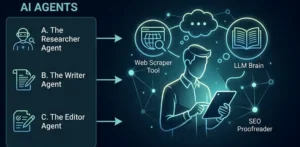
With frameworks like CrewAI, digital creators can set up an entire automated editorial workflow on a laptop. You can deploy a mini-crew consisting of three specialized virtual workers:
-
The Researcher Agent: Scours verified tech platforms for the latest industry updates and raw statistics.
-
The Copywriter Agent: Takes the researcher’s summary and creates a highly engaging, readable blog draft.
-
The Editor Agent: Critiques the text against grammatical rules, checks SEO readability scores, and formats it for publication.
Scenario C: Advanced Inbox Management
Standard email filters can only block spam based on basic keywords. An AI Email Agent reads incoming business queries, understands the underlying intent, categorizes messages by absolute priority, drafts highly customized responses for low-urgency questions, and alerts you only when a high-value client requires your human attention.
5. 5 Best Free AI Agent Platforms for Beginners to Try
If you want to start interacting with autonomous systems without spending money or writing complex lines of code, these free beginner-friendly platforms are excellent entry points:
-
AgentGPT: A completely web-based tool. You go to the site, name your agent, assign it a goal, and watch a live terminal screen as the AI generates its own tasks and collects information in real-time.
-
CrewAI (Cloud Interface): A highly popular platform that allows beginners to build custom multi-agent teams using simple, conversational English setups. You can easily define custom roles, goals, and specific tools for each digital worker.
-
Hugging Face Assistants: A free public hub where you can test community-made autonomous agents. These systems utilize fast, open-source models (like Llama-3) to perform file conversions, web searches, and data synthesis.
-
Microsoft Copilot Studio (Trial Access): Perfect for learning how corporate automation works. It allows you to build simple personal productivity agents that connect directly with daily tools like Outlook, Word, and Excel.
-
AutoGPT (Web Versions): One of the pioneer projects in autonomous AI. The web-based interfaces let you input complex business objectives and sit back while the AI conducts continuous internet research logs.
6. The Challenges and Limitations of Autonomous AI
While this technology is incredibly powerful, it is vital to understand that AI agents are still evolving and come with specific operational limitations:
1. The Risk of Infinite Loops
Because agents operate via continuous self-correction and trial-and-error, they can occasionally get stuck in logical loops. For instance, if an agent encounters a broken website or a strict firewall, it might attempt 50 slightly different code paths consecutively, burning server power until a human manually stops the execution.
2. Hallucinations in Actions
Traditional chatbots sometimes write false facts (hallucinations). If an autonomous agent experiences a hallucination while it has permission to modify your file system or send live emails, it could accidentally perform actions based on faulty data. This is why human validation checkpoints are highly recommended.
3. Increased API Consumption
Running a complex, looped task requires multiple sequential interactions with a Large Language Model. Every single step the agent takes consumes data tokens. If you are using a commercial API, running massive agent loops can become significantly more expensive than generating a single standard response from a basic chatbot window.
7. Future Outlook: What Happens After 2026?
We are moving towards a world dominated by Operating System Agents (OS Agents). In the near future, instead of navigating through dozens of disconnected mobile apps or desktop software programs, users will interact with a single, unified OS Agent.
You will simply say, “Organize my tax receipts from last month, match them with my bank statement, and file the folder away,” and the system will navigate your files and banking tools autonomously in the background. As local AI models become smaller, more efficient, and hyper-optimized, these agents will execute heavy tasks directly on consumer smartphones without needing massive cloud servers, ensuring absolute data privacy.
8. Conclusion: Your Immediate Next Step
The fast evolution of technology proves that knowing how to chat linearly with an AI is quickly becoming a basic necessity. The future digital space belongs to those who know how to build, instruct, and manage autonomous AI Agents.
Don’t let the technical terms overwhelm you. Start your journey with small, manageable steps:
-
Open a free browser tool like AgentGPT or CrewAI.
-
Provide it with a low-risk, simple web research task.
-
Observe how it structures its internal checklist and overcomes blockades.
By exploring these automated frameworks early on, you are setting your personal and professional digital skillsets up for massive success in an increasingly automated internet ecosystem.
🙋♂️ Frequently Asked Questions (FAQs)
Q1. Will AI agents completely replace freelancers and content writers?
No. AI agents are phenomenal at processing data, managing administrative loops, and organizing structured workflows. However, they lack authentic human experience, strategic empathy, original emotional intelligence, and storytelling capabilities. Writers and freelancers who learn to manage AI agents will work 10x faster and dominate the market.
Q2. Do I need to know Python or Java to use an AI agent?
No! Most beginner platforms in 2026 are built with user-friendly “No-Code” interfaces. You can create your agents, define their roles, and assign them tasks using clear, everyday conversational English commands.
Q3. Can I run these autonomous agent tools on a regular smartphone?
Yes. Because most beginner-friendly agent platforms process their heavy computational logic on remote cloud servers, your phone or old computer acts merely as a display control dashboard. It will not drain your local battery or heat up your device’s hardware.
Q4. What is the main difference between an AI tool and an AI agent?
An AI tool requires a human prompt for every single individual action or text line it creates. An AI agent requires only one initial goal and autonomously figures out the sub-tasks, utilizes external software tools, and works continuously until the assignment is completely finished.







[…] diving into the tools, you might also want to read our beginner’s guide on What are AI Agents to understand how autonomous systems […]
[…] a human personal assistant did not do this. An AI Agent […]